


Cart is empty

Hover on image to enlarge

Ashampoo PDF Pro 5

Delivery immediately via email
Technical Support Free
Free
Free Activation Key Authentic Code
Authentic CodeDownload Download Link
Download Link Available Languages Multilingual
Multilingual Platform(s) Windows
WindowsAvailable validity Lifetime
LifetimeCountry Zone(s)  Worldwide
Worldwide Version Full Version
Full VersionThe Benefits of Buying Ashampoo PDF Pro 5 from us
Guaranteed Authenticity
All our softwares are 100% authentic, directly from official manufacturers.
Warranty
Enjoy peace of mind with our during the product's validity warranty, far beyond the standard 30 days.
Free Installation
Enjoy a free installation service for a hassle-free setup.
24/7 Customer Support
Our dedicated team is available anytime to assist you.
Best Prices
Get the best prices: CAD27.99!
Description
Ashampoo PDF Pro 5: Overview
Ashampoo PDF Pro 5 is the complete solution to manage and edit your PDF documents. It offers everything needed to create, convert, edit, merge, and protect PDFs, ensuring documents are readable on any device and securely protected when required. Editing PDFs is now as simple as working in Word.
- Complete PDF management and editing tools
- Supports large, complex PDF documents
- Flexible file viewing options and tab management
- Built-in PDF creation and conversion tools
- Advanced security with encryption and digital signatures
Ashampoo PDF Pro 5: Performance and Workflow
Maximum performance with 64-bit support
Ashampoo PDF Pro 5 leverages full 64-bit architecture to access all available system memory, allowing even large and complex PDF files to be opened, edited, and navigated seamlessly. Users can handle multi-page, graphics-heavy, or data-intensive documents efficiently, without delays or interruptions.


Faster launch and smoother handling
The program is designed for speed and stability, launching quickly and managing multiple PDFs with ease. Complex documents load efficiently, enabling smooth scrolling, precise editing, and responsive navigation for a consistently fluid workflow.
Flexible workspace management
Ashampoo PDF Pro 5 offers versatile viewing options to suit any workflow. PDFs can open in tabs, separate windows, or within the same workspace, giving users the freedom to organize documents for single-focus editing or multitasking. This flexibility helps maintain a tidy, efficient, and user-friendly workspace.

Ashampoo PDF Pro 5: Creation and Security
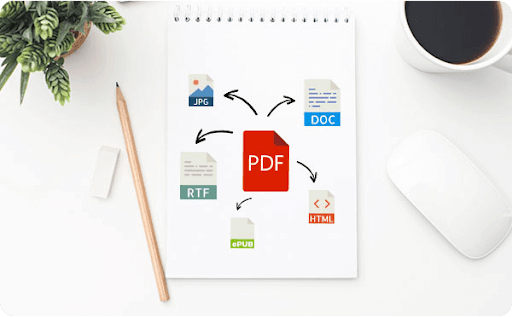
Post-edit PDFs in Word or other formats
Convert PDFs into fully editable documents compatible with MS Office or Ashampoo Office. The software also supports output formats such as HTML, EPUB, JPG, and RTF. Optical Character Recognition (OCR) enables scanned PDFs to become searchable and editable, streamlining document post-editing without losing formatting.
Built-in PDF printer driver
Easily create high-quality PDFs from any Windows application by selecting the Ashampoo PDF virtual printer. The program can automatically downsample images to optimize file size, making documents suitable for online publishing or sharing while maintaining clear quality.


Sign documents for authenticity
Add secure digital signatures to PDFs to ensure authenticity and prevent tampering. This feature allows users to confidently share documents, with recipients able to verify the origin and integrity of the content, enhancing professional trust and security.
System Requirements
- Operating System: Windows® 11, Windows® 10
- Device: Any device supporting the above operating systems
- Other Requirements: Internet connection required for activation; license verified periodically
Frequently Asked Questions
-
Can I edit scanned PDFs in Ashampoo PDF Pro 5?
Yes, with OCR support, scanned PDFs can be converted into editable and searchable documents.
-
Does Ashampoo PDF Pro 5 support multiple file formats?
Yes, it supports PDF creation, conversion to MS Word, HTML, EPUB, JPG, and RTF formats.
-
Can I compare two PDF documents easily?
Yes, simply drag and drop files into the program for automatic document comparison.
-
How do I download and activate Ashampoo PDF Pro 5?
Once your purchase is complete, you will receive a secure download link and a valid license key by e-mail. Follow the installation instructions, enter your product key and start using Ashampoo PDF Pro 5 immediately.



